
How Do You Modernize Azure Pipelines Gradually? An Azure Pipeline Modernization Decision Hub
Modernize legacy ETL with Azure pipeline modernization: retain or refactor workloads, bridge hybrid data, reuse logic, and automate CI/CD.

How Do You Modernize Azure Pipelines Gradually? An Azure Pipeline Modernization Decision Hub
Azure data teams rarely need a greenfield rebuild. Fabric Data Factory currently connects to more than 170 data sources, including hybrid and multicloud sources, so we can improve the operating model before replacing every transformation.
Azure pipeline modernization works best when we classify each legacy workload, retain compatible packages behind an integration runtime, and refactor only pipelines that need cloud-native scale or continuous event processing. We use a shared orchestration and monitoring model, reusable transformation components, Git-based deployment, and parallel validation so teams can migrate without rebuilding everything at once.
Below, we provide a decision hub for assessing what to retain, choosing a hybrid bridge, designing shared logic, and operating batch and event workloads. We reviewed this guidance on August 18, 2026, then added the release and validation controls that let an Azure data engineering team move in controlled stages. For teams building their skills alongside the migration, our Azure learning paths help connect architectural decisions to practical engineering work.
What Should Azure Pipeline Modernization Retain, Lift, Wrap, Refactor, or Retire?
The first modernization mistake is treating every existing job as equally disposable. Some packages still meet their SLA, encode difficult business rules, and have stable operational ownership. Others are expensive to maintain, impossible to test safely, or fundamentally mismatched to continuous event processing.
We start with a workload inventory, then make a deliberate choice for every pipeline. The goal is not to preserve old technology indefinitely. It is to spend redesign effort where it produces a measurable gain in reliability, speed, reuse, governance, or operating cost.
| Decision | Use It When | First Move | Evidence To Collect |
|---|---|---|---|
| Retain | The job is stable, compatible, and still meets its SLA | Keep it running while documenting its contract | Owner, consumers, run history, failure rate |
| Lift | An existing package needs cloud hosting, not redesign | Run it on Azure-SSIS Integration Runtime | Dependencies, connectivity, package compatibility |
| Wrap | A legacy process must continue while Azure coordinates it | Call it from a pipeline or bridge it through an integration runtime | Inputs, outputs, schedule, retry behavior |
| Refactor | The workload needs cloud scale, reusable logic, or event processing | Move logic into parameterized flows or code components | Latency, volume, duplicate logic, cost |
| Retire | The output is unused, duplicated, or replaced | Disable only after validation and sign-off | Consumers, retention needs, replacement proof |
Azure-SSIS Integration Runtime supports packages deployed to the SSIS catalog on managed database services, as well as supported package-deployment locations. It can also reach on-premises data through network integration or a self-hosted proxy, making lift a realistic bridge rather than a compromise with no exit plan. Review the runtime capabilities before classifying a package as a rewrite candidate.
We make each decision reversible at first. A retained job gets an owner, a monitored SLA, and an explicit trigger for reassessment. A lifted job gets the same reconciliation tests as a rewritten one. A wrapped job gets a clear contract so that it can later be replaced without destabilizing downstream consumers. Our SSIS migration guide provides the narrower package-migration detail that supports this broader decision process.
Which Bridge Fits Hybrid Batch and Streaming Workloads?
A bridge is not one product choice. It is a pattern that separates orchestration, transformation, private connectivity, and real-time ingestion so each part can mature at its own pace. We select the smallest change that safely moves the current workload, then create a path to replace it when the business case is proven.
The matrix below keeps the comparison practical. Batch support does not mean a tool is the right place for continuous events, and Git support does not remove the need to version configuration, tests, and deployment scripts.
| Tool | Best Workload | Rewrite Effort | Batch Support | Streaming Role | Connectivity | Git Support | Cost Inputs |
|---|---|---|---|---|---|---|---|
| Azure-SSIS Integration Runtime | Existing SSIS packages | Low | Yes | Not a stream processor | Virtual network or self-hosted proxy | Version packages separately, deploy factory assets through CI/CD | Runtime node time, catalog database, storage |
| Self-Hosted Integration Runtime | Private-source movement and hybrid execution | Low | Yes | Bridge only | On-premises or private network | Factory definitions in Git | Host infrastructure and runtime activity |
| Mapping Data Flows | Repeatable low-code transformations | Medium | Yes | Micro-batch, not a dedicated event layer | Linked services and managed networking | Versioned factory artifacts | Data-flow compute time |
| Managed Spark Notebooks | Complex code-first transformations | Medium to high | Yes | Unified batch and stream processing | Governed cloud and private connectivity | Git folders and CI/CD pipelines | Compute, storage, and network use |
| Fabric Data Factory | Low-code ETL, ELT, and orchestration | Low to medium | Yes | Coordinates event-aware workflows | Cloud and hybrid gateway patterns | Workspace Git and deployments | Capacity consumption |
| Event Hubs And Eventstream | Event ingestion, routing, and real-time transforms | Varies | Capture can feed batch | Primary streaming layer | Event producers and cloud destinations | Deploy supported definitions through source-controlled release flows | Throughput, capture, processing, or capacity |
We avoid presenting a fixed migration price because usage, region, runtime size, and event volume matter. Data Factory charges for orchestration by activity run and for execution by integration-runtime time, with runtime charges prorated by the minute. Use those pricing mechanics as inputs to a workload forecast, then compare them with the legacy server, support, and failure-recovery cost.
The best Azure platform for batch and streaming pipelines is usually a coordinated set of services, not a single orchestration layer forced to do everything. For a deeper selection view, see our Azure ETL tools.
How Does Hybrid Orchestration Work, and When Should Workloads Be Refactored?
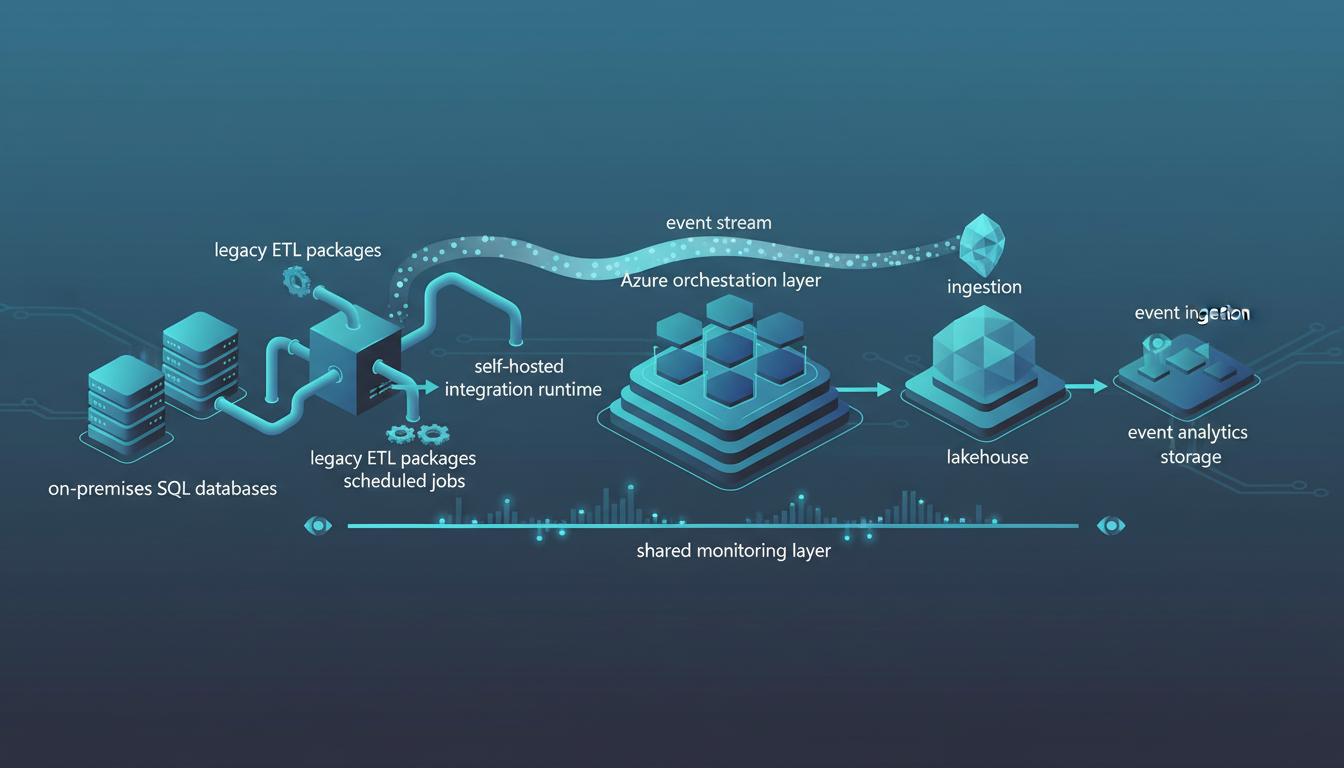
Hybrid orchestration gives teams a control plane in Azure while usable data sources and workloads remain private or on premises. We can schedule a nightly warehouse load, call a stable package, invoke a transformation job, and monitor the result without moving every source system on day one.
A self-hosted integration runtime is the key bridge for many teams. It receives scheduled work through a secure control channel and moves data directly between private stores and cloud services. Current guidance recommends a minimum host configuration of four CPU cores, 8 GB of RAM, and 80 GB of available disk, while one runtime can use up to four nodes for higher availability and throughput. See the hybrid runtime guidance before sizing the bridge.
How Should Nightly Loads and Events Divide Responsibility?
We use the orchestration layer for schedules, dependencies, retries, and warehouse-loading sequences. We use a streaming layer for continuous events, then land events into analytics storage where they can join historical data under governed access and lineage rules.
This division prevents a common failure mode: designing a nightly batch pipeline that tries to impersonate an event processor. Eventstream can ingest, transform, and route real-time events, while event-focused storage supports fast operational analysis. The streaming ingestion model is useful when we need both lanes without creating two unrelated delivery teams.
How Do SQL Agent Schedules and Failures Map to Azure?
We translate SQL Server Agent schedules into schedule triggers, dependencies into pipeline activities, configurations into parameters and environment-specific connections, and failures into retry policies, alerts, and runbooks. We do not assume schedule semantics are identical after migration.
Some Agent scheduling options are ignored during assisted SSIS job migration, and later scheduled runs in Data Factory are independent of an earlier run’s execution state. That difference matters for overlapping jobs, backlogs, and downstream locks, so we test it explicitly using the schedule migration notes.
When Is Refactoring Worth the Effort?
We refactor when a workload needs lower latency, elastic scale, complex reusable logic, stronger testability, or more maintainable failure handling. A stable nightly package with modest volume may be a lift candidate. A pipeline that repeats transformations across projects, misses latency targets, or must process unbounded events is a better refactor candidate.
The end state should still feel like one operating model. Our batch and streaming architecture explains how a shared lakehouse can reduce unnecessary copies while preserving the distinct responsibilities of batch and event processing.
How Do Teams Design Reusable Transformation Logic?
Duplicate transformations are rarely caused by laziness. They usually appear because the first project solved an urgent local problem, no shared contract existed, and later teams could not safely discover or change the original implementation. Azure pipeline modernization should make reuse a design decision, not an accidental side effect of copying JSON or notebooks.
We begin by inventorying repeated joins, schema cleanups, quality rules, watermarks, column mappings, and error-handling patterns. Then we assign each reusable component an owner, version, input contract, output contract, test data, and deprecation path.
How Should Pipelines and Data Flows Be Parameterized?
Parameterize values that legitimately vary, such as source paths, tables, watermarks, target schemas, and environment names. Keep business rules explicit rather than hiding every difference behind a generic component that nobody can understand.
Azure Data Factory supports parameters in pipelines, datasets, linked services, and mapping data flows. The platform’s own examples show how parameterization lets one dataset address different storage folders across runs, making this a useful basis for reusable transformation assets. See reusable data flows.
When Should a Team Use Templates, Notebooks, or Shared Libraries?
We use templates for repeatable orchestration topology, such as a standard ingest, validate, publish, and notify sequence. We use notebooks for complex code-first transformations, and shared libraries for logic that must be unit-tested independently of an individual pipeline.
The boundary matters. A generic component should handle a stable concern, such as schema checks or audit columns. Domain-specific business logic should remain visible in the consuming workflow, where its owner can review and test it.
How Do We Govern Reuse Without Creating a Bottleneck?
We version interfaces and make breaking changes visible. We also measure adoption, duplicate-rule retirement, component failure rate, and time to safely change a shared asset. These measures reveal whether reuse is reducing engineering effort or simply moving complexity to a central team.
A shared architecture works best when platform conventions are clear and teams can discover approved patterns. Our unified platform architecture shows how common storage, governance, and delivery practices support that outcome.
How Is Azure DevOps CI/CD Implemented Safely?
CI/CD for data pipelines is not merely exporting a template and deploying it. We need to separate environments, parameterize connections, protect secrets, validate transformation behavior, approve production promotion, and preserve a known-good artifact for rollback.
We use a release flow that treats pipeline configuration as production code. That gives data teams the same auditability and repeatability expected from application delivery, while recognizing that a bad change can affect schedules, credentials, data quality, and consumers at once.
How Should Environments and Branches Work?
We keep development, test, and production separate, with environment-specific parameters instead of copied definitions. A pull request should establish review, automated validation, and test evidence before changes are merged into the release branch.
For workspace-oriented implementation, source control and deployment pipelines are designed around distinct environments. The deployment flow supports connecting a workspace to Git, then promoting content through defined stages.
What Should the Build and Approval Flow Test?
Our build flow validates pipeline assets, checks schemas and parameter bindings, runs unit or component tests where possible, and generates a deployment artifact. The release flow deploys that immutable artifact into test, runs reconciliation and smoke tests, then waits for approval before production.
For Azure Data Factory, the automated publishing utility can validate resources and export deployment artifacts. We use the release utility to avoid relying on manual portal publishing as the production release mechanism.
How Do We Handle Secrets, Triggers, and Rollback?
We store credentials in a managed secret store and grant deployment identities only the access they need. Before changing active trigger definitions or sensitive connections, we stop the affected triggers, deploy, verify the new configuration, and restart them only after smoke tests pass.
Rollback means redeploying the last validated artifact and restoring its approved parameters, not editing production under pressure. We keep that artifact, the test evidence, and the recovery runbook together. Teams that need to build these habits alongside the platform can use our modern Azure course.
How Can Vision Board Help Your Team Modernize Gradually?
Vision Board helps Azure data engineering teams build the judgment needed to modernize without creating a second generation of brittle pipelines. In our training, we work from existing packages, schedules, source constraints, and operating goals, then help teams choose what to retain, wrap, refactor, or retire. We teach teams to design reusable transformations, coordinate batch and streaming paths, and deploy safely with source control, tests, approvals, and rollback plans. The result is not a generic cloud migration checklist. It is a practical way to reason about architecture, delivery, and production ownership while work continues. Our instructors keep the discussion anchored in real delivery constraints, not abstract platform diagrams. If your team is deciding between a limited lift, a hybrid bridge, and a deeper redesign, we can help you make the trade-offs visible and build the skills to execute them with confidence. Explore Vision Board
FAQs on Azure Pipeline Modernization
Can Azure Run Nightly Warehouse Loads and Real-Time Event Streams Together?
Yes. Use scheduled pipelines for dependencies and streaming ingestion for events, then land both in governed storage with shared monitoring, lineage, and release controls consistently.
How Do We Keep On-Premises ETL Without Rewriting Everything?
Keep stable packages running through an integration runtime, move outputs to cloud storage, and refactor only processes whose latency, scale, or maintenance needs justify change.
How Can Teams Reuse Transformations Across Projects?
Turn repeated rules into parameterized pipeline components, shared templates, or tested libraries. Version their interfaces, assign ownership, and release changes through the same controlled process.
What Must Be Validated Before a Production Cutover?
Validate configuration, secrets, schema contracts, row counts, reconciliations, performance, failures, access, lineage, and run cost before promotion. Retain the previous artifact until all acceptance criteria pass.