
How to Migrate SSIS Pipelines to Azure | Vision Board
SSIS to Azure migration: choose Azure-SSIS IR, ADF refactoring, or Fabric planning with compatibility, network, cost, and cutover guidance.

How to Migrate SSIS Pipelines to Azure with Vision Board
Microsoft’s performance guidance says a Basic Azure SQL Database catalog supports 8 workers in an Azure-SSIS Integration Runtime. We built this guide for data engineers who need to preserve delivery while deciding which packages to retain, refactor, or redesign.
For SSIS to Azure migration, start with Azure-SSIS Integration Runtime in Azure Data Factory when preserving packages matters more than immediate redesign. Inventory every dependency, pilot representative packages, then choose lift-and-shift, selective modernization, or ADF refactoring according to compatibility, private networking, operating cost, and eventual Fabric plans.
We cover the package-level decision, compatibility testing, network architectures, cutover sequence, cost controls, and the current boundary between ADF and Fabric.
How Does SSIS to Azure Migration Work Without a Full Rewrite?
The practical starting point is simple: run suitable existing packages on Azure-SSIS IR, then modernize only where evidence says you should. This preserves familiar SSIS projects, deployment practices, and operational knowledge while the team learns Azure’s networking, identity, and orchestration model.
Azure-SSIS IR is managed compute dedicated to package execution. You can keep packages in SSISDB or use supported package-store approaches, then invoke them through ADF pipelines. For a quick visual primer before the implementation detail, our Home resources can support the team’s internal learning plan.
| Migration Path | Rewrite Effort | Package Compatibility | Network Fit | Operations | Cost Control | Future Readiness |
|---|---|---|---|---|---|---|
| Azure-SSIS IR Lift-And-Shift | Low | Highest for existing packages | Public network, VNet, or proxy | Retains SSIS tooling and package operations | Right-size nodes and stop idle compute | Strong transition path |
| Partial Modernization | Medium | Keep suitable SSIS packages | Combine SSIS execution with ADF services | Operate old and new workloads together | Retire costly packages first | Good incremental path |
| ADF Refactoring | High | Rebuild package logic | Azure, managed VNet, or self-hosted runtime | Cloud-native orchestration | Remove dedicated SSIS compute where practical | Best for reducing SSIS reliance |
| Fabric Adoption | High For SSIS | No direct SSIS execution | Requires a redesigned network model | Migrate supported pipeline assets only | Assess capacity separately | Best after capability review |
The key distinction is execution versus modernization. Microsoft’s runtime overview describes Azure-SSIS IR as the native route for lifting and shifting existing SSIS workloads, while ADF refactoring changes the implementation itself.
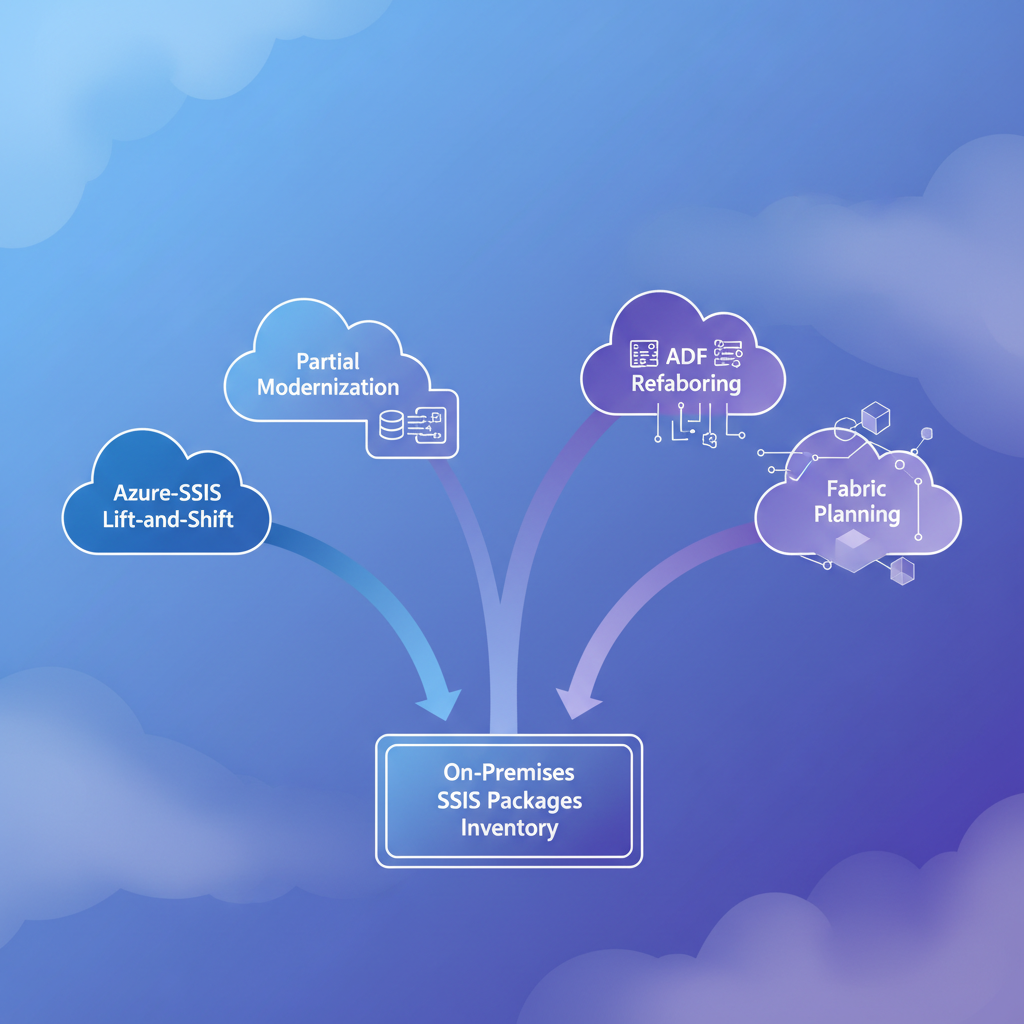
Which Package Migration Path Should We Choose?
We recommend deciding package by package, not declaring one platform winner for an entire estate. A nightly warehouse load with standard components can be an excellent lift-and-shift candidate, while a package tied to local executables or repeated transformation logic may deserve more change.

When Is Azure-SSIS IR the Right Lift-And-Shift Choice?
Choose this route when speed, behavioral continuity, and limited rewrite risk matter most. It is particularly useful for packages that already work reliably, have manageable dependencies, and need a cloud landing zone before broader modernization.
When Does Partial Modernization Make More Sense?
Use a mixed approach when only certain package elements create operational drag. We often see teams retain a dependable SSIS core while replacing duplicated ingestion, credentials, paths, and common transformations with parameterized ADF assets.
When Is ADF Refactoring Worth the Work?
Refactor when the package’s dependencies, supportability, or cloud operating model make long-term retention expensive. Parameterization minimizes hard coding and increases reuse, according to ADF guidance, which helps teams stop rebuilding the same transformation in every project.
When Is Fabric a Future Destination Rather Than a First Move?
Treat Fabric as a planned destination for supported pipelines and broader analytics workloads, not as a direct host for SSIS packages. We use our Courses & Store materials to help engineers separate immediate migration decisions from longer-term platform skills.
How Do We Build a Package Inventory and Compatibility Score?
A migration succeeds or fails in the inventory. Package names and schedules are not enough. We need to know what each package reaches, how it authenticates, what runs before and after it, and whether its behavior depends on a server feature that will not travel with it.
Start with one shared worksheet, assign each package an owner, and require evidence for every risk decision. Keep it in the same backlog as the migration work so discovery does not become a document that nobody revisits.
| Inventory Field | Why We Capture It | Migration Decision It Supports |
|---|---|---|
| Package, Project, And Owner | Establish accountability | Pilot order and cutover ownership |
| Criticality And SLA | Define business impact | Rollback and validation depth |
| Sources, Destinations, And Storage Accounts | Map data movement | Network and regional design |
| Schedule And SQL Agent Dependency | Find orchestration coupling | Trigger replacement work |
| Credentials And Protection Level | Identify secret handling | Identity and deployment tests |
| Script Tasks And Custom Components | Surface runtime dependencies | Custom setup or redesign |
| Transactions And Upstream Dependencies | Expose failure coupling | Pilot scope and rollback |
| Duration, Concurrency, And Failure History | Create an operating baseline | IR sizing and monitoring |
How Do We Score Compatibility Risk?
Use a simple 0 through 3 score. A score of 0 means direct pilot candidate. A score of 1 means test a known dependency. A score of 2 means engineered migration work. A score of 3 means architecture review before committing to a destination.
What Must We Test Before Deployment?
Test Script Tasks, custom assemblies, third-party connectors, package protection settings, Windows authentication, file shares, transaction behavior, and dependency chains. Azure-SSIS IR supports custom setup scripts for drivers, assemblies, and extensions, as outlined in Microsoft’s custom setup guide.
How Do We Handle SQL Agent Dependencies?
Record every job, schedule, alert, and stored procedure that starts a package. Azure SQL Database lacks SQL Agent scheduling, so use Telegram community discussions to standardize generated ADF scheduling objects.
How Should Azure-SSIS IR Connect to On-Premises Data?
Networking determines whether a migration feels like a controlled transition or a late-stage emergency. We choose the simplest secure route that satisfies data access, DNS, authentication, and operational ownership requirements.

For public-accessible sources, Azure-SSIS IR can operate with approved endpoints and firewall rules. For private endpoints, private DNS, or direct access to on-premises systems, use VNet injection connected through VPN or ExpressRoute. Microsoft’s VNet guidance also describes the self-hosted IR proxy alternative.
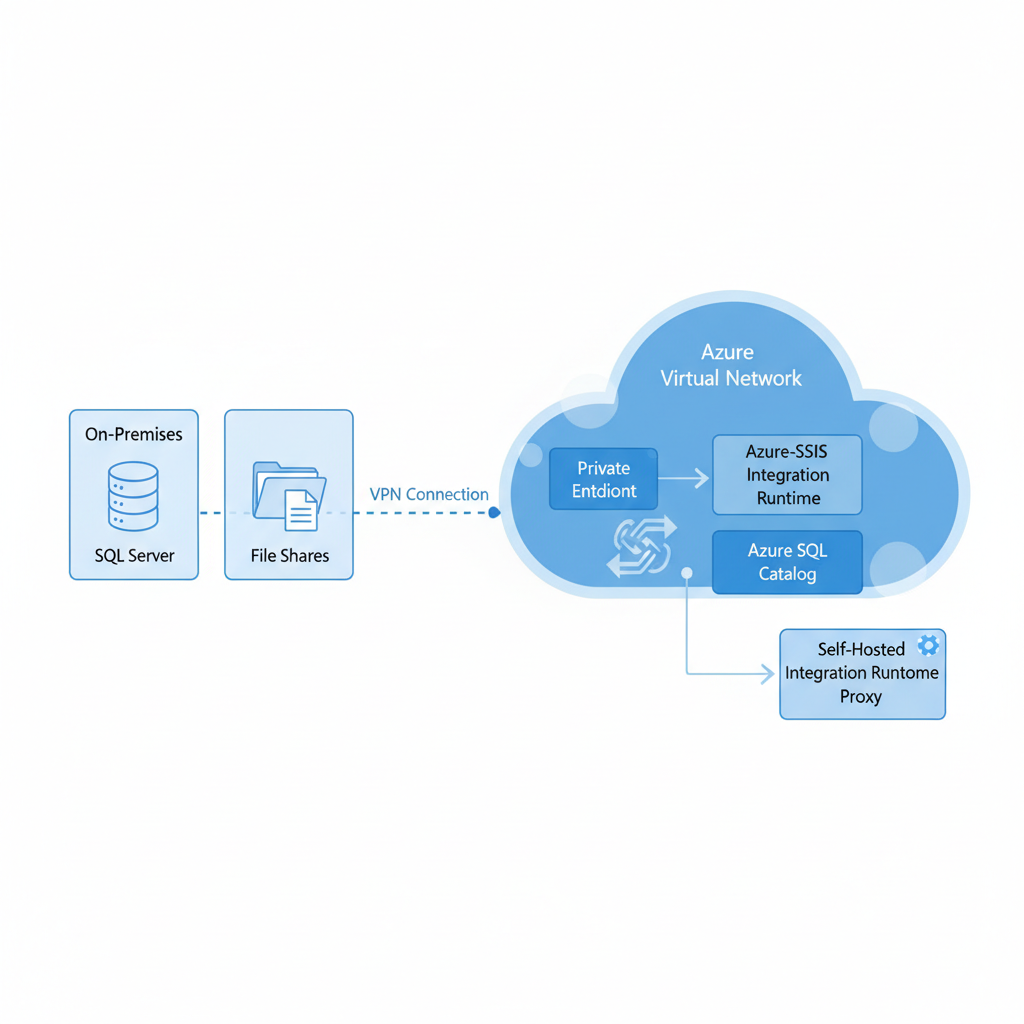
A self-hosted proxy can be helpful when corporate networking is too restrictive for VNet injection. It is not a universal substitute: Microsoft documents its current support for Data Flow Task and Execute SQL or Process Tasks, so we assess every package’s tasks before selecting that route.
Use this decision sequence:
- Public Access: Choose it only when approved source and destination endpoints can be securely reached.
- VNet Injection: Choose it for private endpoint access, private DNS needs, or direct connectivity to an on-premises network.
- Self-Hosted Proxy: Choose it for supported task types when a VNet route is impractical.
- Separate Environments: Keep development, test, and production connections isolated, with separate credentials and validation evidence.
For a visual explanation of these choices, our YouTube Playlist can help engineers discuss the network design consistently.
What Is the Safest Cutover and Cost-Control Sequence?
We use a phased approach because a successful package run is not yet a successful production migration. The goal is to prove data correctness, scheduling behavior, operational observability, and rollback readiness before a business-critical workload changes hands.

First, assess the inventory and choose a representative pilot. Next, provision the catalog, runtime, network path, and custom components. Deploy the package, execute it from ADF, compare output and execution duration, then run parallel production-like tests before cutover. Preserve the old schedule and package version until the rollback window closes.
The seven-step sequence is:
- Assess inventory, criticality, dependencies, and compatibility score.
- Select representative pilot packages across low-risk and high-dependency cases.
- Provision Azure-SSIS IR, SSISDB, identity, networking, and required components.
- Deploy packages and configure ADF execution and schedules.
- Validate row counts, schemas, business rules, durations, and error behavior.
- Run parallel workloads, approve cutover, and monitor the first production cycles.
- Retain rollback procedures, prior schedules, package versions, and reconciliation results.
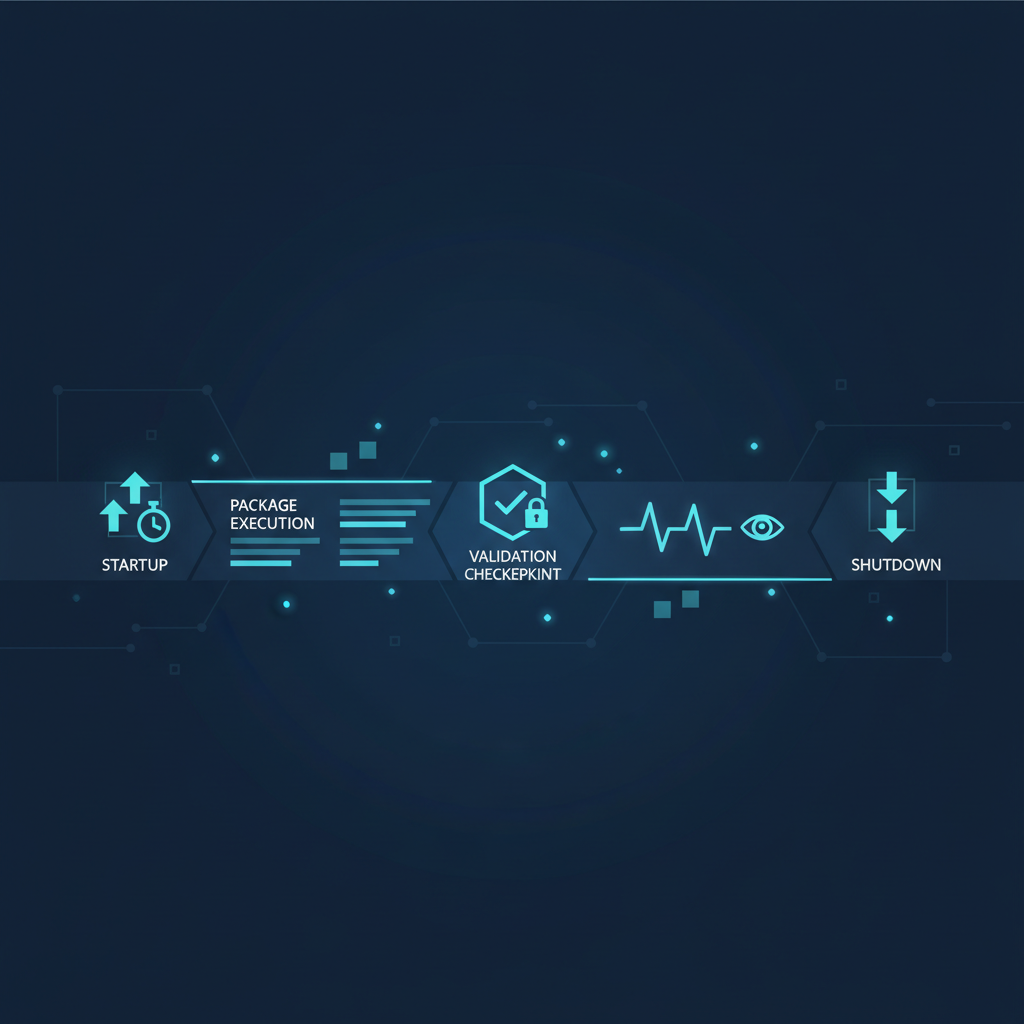
Cost control starts with a small runtime configuration and measured scaling. Microsoft recommends adjusting node count after monitoring throughput, and the runtime can be scheduled to start and stop around a batch window through runtime scheduling. We also watch SSISDB performance, parallel executions, idle capacity, and verbose logging before assuming the compute size is the problem.
A Fabric move belongs after this stabilization work, not inside it. Current Fabric limitations state that SSIS IR is unavailable, while the ADF upgrade flow excludes SSIS IR infrastructure, self-hosted IR migration, and VNet-injected runtime migration. Our Success Stories can help teams frame this as a staged capability journey rather than a rushed platform replacement.
Build Your Azure Migration Skills with Vision Board
Azure migration succeeds when people can make sound package decisions under real delivery pressure. Our WhatsApp Channel gives data engineers a practical way to stay connected while they practice reading dependencies, choosing a runtime model, designing a cutover, and explaining tradeoffs to stakeholders. Our lessons turn the migration worksheet in this guide into repeatable habits, from testing a Script Task to deciding when a pipeline deserves refactoring. You can learn at your own pace, compare approaches with peers, and bring active project questions into our community. We also share concise examples and operational checklists that help teams retain control while new Azure and Fabric work continues. Start with the resources that fit your immediate skill gap, then use them alongside a real pilot. Return whenever deployment planning, difficult validation, or team resistance calls for a practical next step. Visit Vision Board.
FAQs on SSIS to Azure Migration
Can We Move SSIS Packages to Azure Without Rewriting Them?
Yes. Azure-SSIS Integration Runtime runs existing packages with familiar SSIS tooling after teams validate dependencies, credentials, network access, and execution behavior through a representative pilot.
Can Azure-SSIS IR Access On-Premises SQL Server and File Shares?
Yes. Connect Azure-SSIS IR through a VNet linked to the on-premises network, or use a self-hosted integration runtime proxy when package task support permits it.
Do Script Tasks and Third-Party Connectors Need Special Planning?
Yes. Test runtime compatibility, assemblies, drivers, licenses, and custom setup before production deployment. Verify each dependency at package level instead of assuming server settings transfer.
Is Fabric a Direct Replacement for Azure-SSIS IR?
No. Fabric currently has no SSIS Integration Runtime, so existing packages need Azure-SSIS IR, redesign into supported services, or an approved alternative execution strategy today.
How Can We Reduce Azure-SSIS IR Idle Cost?
Schedule startup before batch execution and shutdown afterward. Begin with measured capacity, monitor throughput and catalog performance, then scale only when workload demand requires it.