
Which Azure ETL Migration Path Preserves Existing Logic?
Choose an Azure ETL migration path that retains, wraps, converts, or rebuilds legacy logic with hybrid architecture and CI/CD controls.
Which Azure ETL Migration Path Preserves Existing Logic?
A pipeline move is also an operating-model move: Azure Data Factory keeps pipeline-run data for only 45 days, so observability needs to be designed into the migration rather than added after cutover.
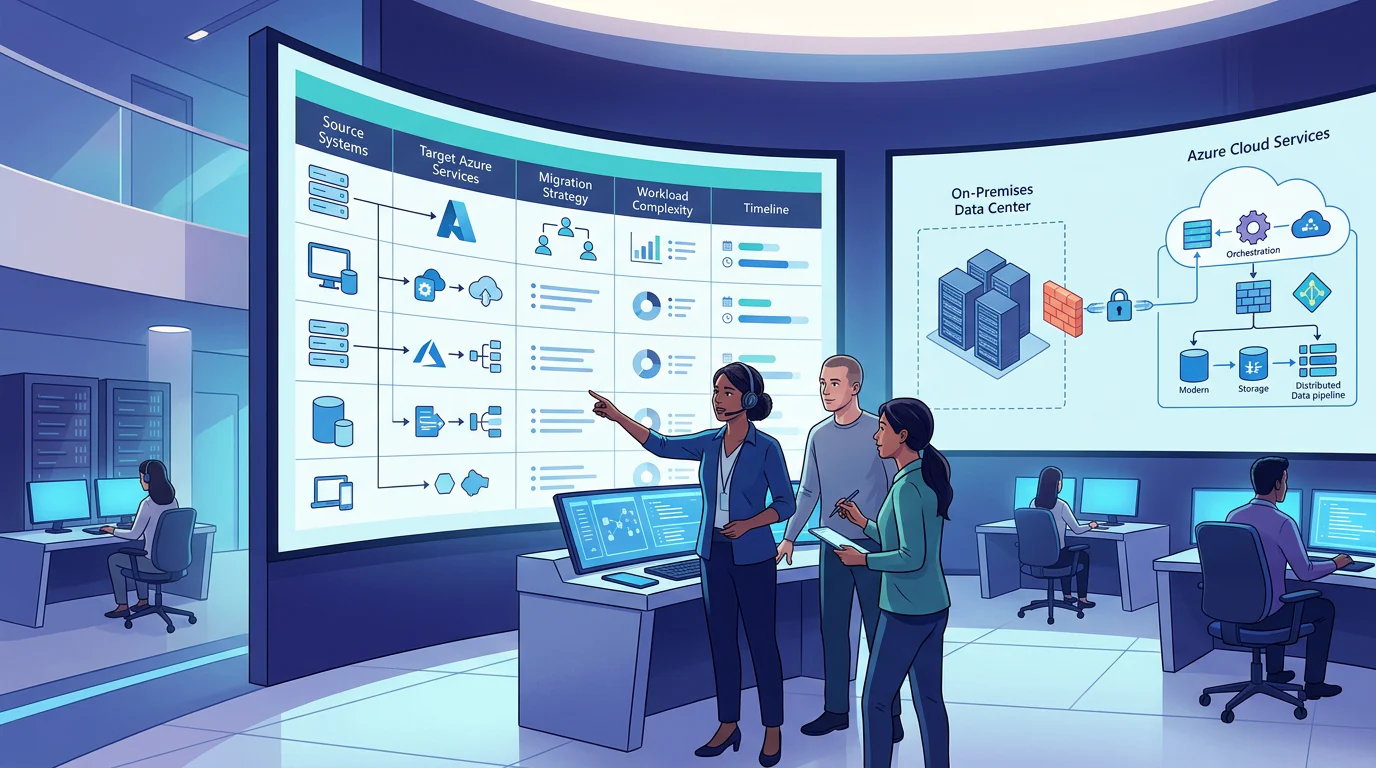
For an Azure ETL migration path that keeps existing logic, we classify every workload before moving it: retain compatible SSIS packages on Azure-SSIS Integration Runtime, wrap retained on-premises processes with a self-hosted runtime, convert portable patterns, and rebuild only assets whose dependencies, risk, or operating cost make refactoring worthwhile.
We will map the legacy estate to Azure targets, show a secure hybrid pattern, prevent transformation duplication, and establish delivery controls that let teams modernize in deliberate waves.
Which Azure ETL Migration Path Preserves Existing Logic?
The wrong framing is, “How do we move everything?” The useful question is, “Which path protects this workload’s business logic while reducing the risk we carry forward?” We use four paths because legacy assets rarely share the same connector support, network placement, operational value, or urgency.
Microsoft supports running SSIS workloads in Azure through Azure-SSIS Integration Runtime, including deployment and management with familiar tools. That makes it the strongest preserve-first option for packages that work today and have no immediate business case for redesign, as outlined in its lift-and-shift guidance.
| Migration Path | Best Fit | Logic Change | Maintenance Tradeoff | Azure Target |
|---|---|---|---|---|
| Retain | Compatible, business-critical SSIS packages | Minimal | Continue package-level maintenance | Azure-SSIS Integration Runtime |
| Wrap | On-premises jobs, private drivers, or transitional tools | Minimal | Maintain bridge infrastructure temporarily | Self-hosted IR plus ADF or Synapse Pipelines |
| Convert | Portable copy, SQL, orchestration, and control-flow patterns | Moderate | Reduce legacy runtime dependence | Native ADF or Synapse Pipelines |
| Rebuild | Unsupported components, brittle logic, or high operating burden | Highest | Create a maintainable cloud-native design | Native pipelines, SQL, or governed transformation services |
Retain is not a failure to modernize. It is a deliberate way to protect proven logic while the team builds cloud operating discipline. Wrap is similarly purposeful when a private source, custom driver, or third-party process cannot move on the same timetable as orchestration. Convert when the behavior is clear and the target service offers a close equivalent. Rebuild only after a dependency, cost, reliability, or governance finding makes the existing design a poor long-term fit.
For broader tool selection after classification, use our Azure ETL modernization guide.
How Do We Inventory and Map Legacy ETL Assets to Azure?
We begin with an asset inventory, not a platform diagram. One row per package, SQL Agent job, stored procedure, file transfer, and third-party workflow creates the evidence needed to avoid a blanket rewrite decision. Include the owner, business process, schedule, source, sink, package location, credentials, dependencies, data volume, execution duration, failure handling, and recovery expectation.
The inventory must also record whether each job can be tested against a controlled dataset and who accepts reconciliation. That turns migration from a technical handoff into an accountable operating change. Our Azure learning paths can help teams identify the practical skills needed to assess and operate these migration decisions.
What Should the Inventory Capture?
- Execution design: Package name, job step, trigger, schedule, timeout, retry policy, and upstream or downstream dependencies.
- Data contract: Source and target locations, schema expectations, watermark logic, volume pattern, and late-arriving-file behavior.
- Runtime constraints: Private networks, custom drivers, Windows authentication, package version, installed components, and outbound access.
- Operational ownership: Alert recipient, service level objective, business approver, reconciliation owner, and rollback condition.
How Should Source Assets Map to Azure Targets?
| Legacy Asset | Azure Target | Migration Check |
|---|---|---|
| SSISDB project or package | Azure-SSIS IR and SSISDB | Validate runtime compatibility and execution history |
| MSDB, file system, or Azure Files package | Azure-SSIS IR package store | Confirm package version and protection settings |
| SQL Agent SSIS job | ADF pipeline, Execute SSIS Package activity, schedule trigger | Review scheduling differences |
| Stored procedure | SQL Script or Stored Procedure activity, or retained database call | Reconcile outputs and side effects |
| File transfer | Copy activity with parameterized connections | Validate paths, checksums, and late files |
| Third-party workflow | Wrapped process through self-hosted IR | Document drivers, support, and modernization exit criteria |
| Secrets | Managed identity and Key Vault references | Remove secrets from source control |
| Monitoring | ADF monitoring and Azure Monitor | Route diagnostics before production cutover |
The SQL Server Management Studio wizard can migrate qualifying SQL Agent SSIS jobs into ADF resources, but it has documented limitations, including file-system-only package location support and schedule differences that require manual verification. Treat the job migration wizard as an accelerator, not as proof that the target behaves identically.
Our SSIS migration playbook can help teams turn the mapping table into a prioritized delivery backlog.
How Do We Run Hybrid Batch and Event-Driven Workloads?
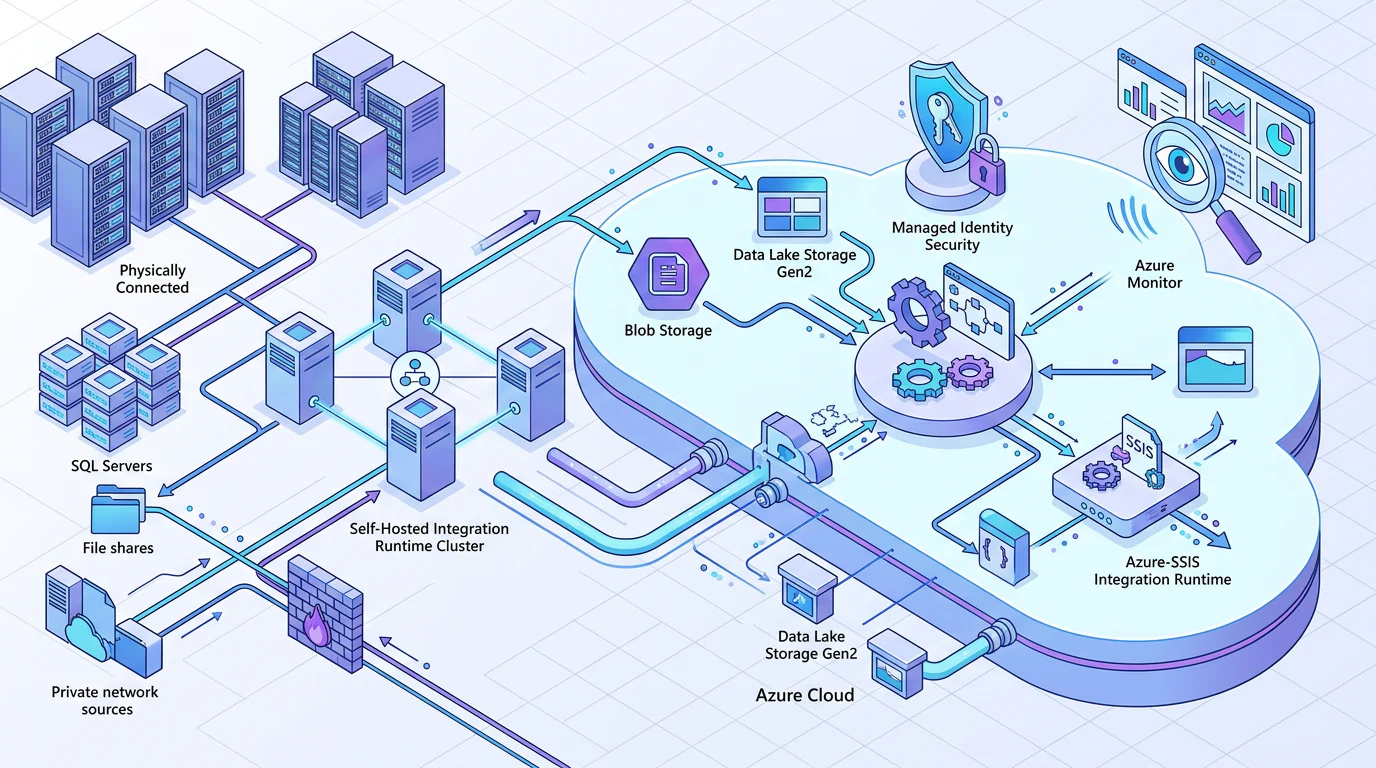
Hybrid design works when orchestration stays central while execution happens close to the data. ADF and Synapse Pipelines can coordinate jobs, while a self-hosted integration runtime handles data movement and activity dispatch across private or on-premises environments. Azure-SSIS IR remains the execution plane for retained SSIS packages.
The runtime choice should follow network reality. Microsoft documents three ADF integration runtime types, Azure, self-hosted, and Azure-SSIS, with self-hosted IR supporting private connectivity and custom components that managed Azure runtimes cannot host. Review the runtime comparison before deciding that every source can be reached from cloud-managed compute.
How Should the Hybrid Architecture Work?
Use a self-hosted IR cluster near private data sources, then let the ADF or Synapse control plane schedule and monitor work. Keep Azure-SSIS IR separate for packages that should retain their runtime. Use managed identities to access each storage account, and use Key Vault references when a connector still requires a secret.
For files arriving in Azure storage, use event triggers rather than polling whenever that matches the business process. ADF and Synapse Pipelines integrate with Event Grid for storage-event triggers, as described in Microsoft’s event trigger guidance.
Where Does Streaming Fit?
Nightly warehouse loads and continuous events are related, but they are not the same execution model. Keep batch orchestration in ADF or Synapse Pipelines, then connect streaming services to the same governed storage and monitoring standards. This prevents the team from creating a second, unowned transformation estate merely because event data arrives continuously.
If the architecture question includes both batch and streaming, compare the shared lakehouse approach before creating parallel persistence and transformation layers.
What Changes in Fabric Data Factory?
Fabric Data Factory can be a future modernization target, but it is not a direct SSIS replacement. Current Microsoft documentation states that Azure-SSIS IR is not available in Fabric, and self-hosted IR workloads need to be recreated through an on-premises data gateway. Keep retained SSIS workloads on their supported path while assessing Fabric separately.
How Do We Reuse Transformations Across Azure Projects?
Duplicated transformations usually begin as reasonable local fixes. One project needs file normalization, another needs audit columns, and a third needs a watermark pattern. Without a reusable-component design, each project copies the logic, changes it slightly, and creates a maintenance problem that is harder to see than a failed pipeline.
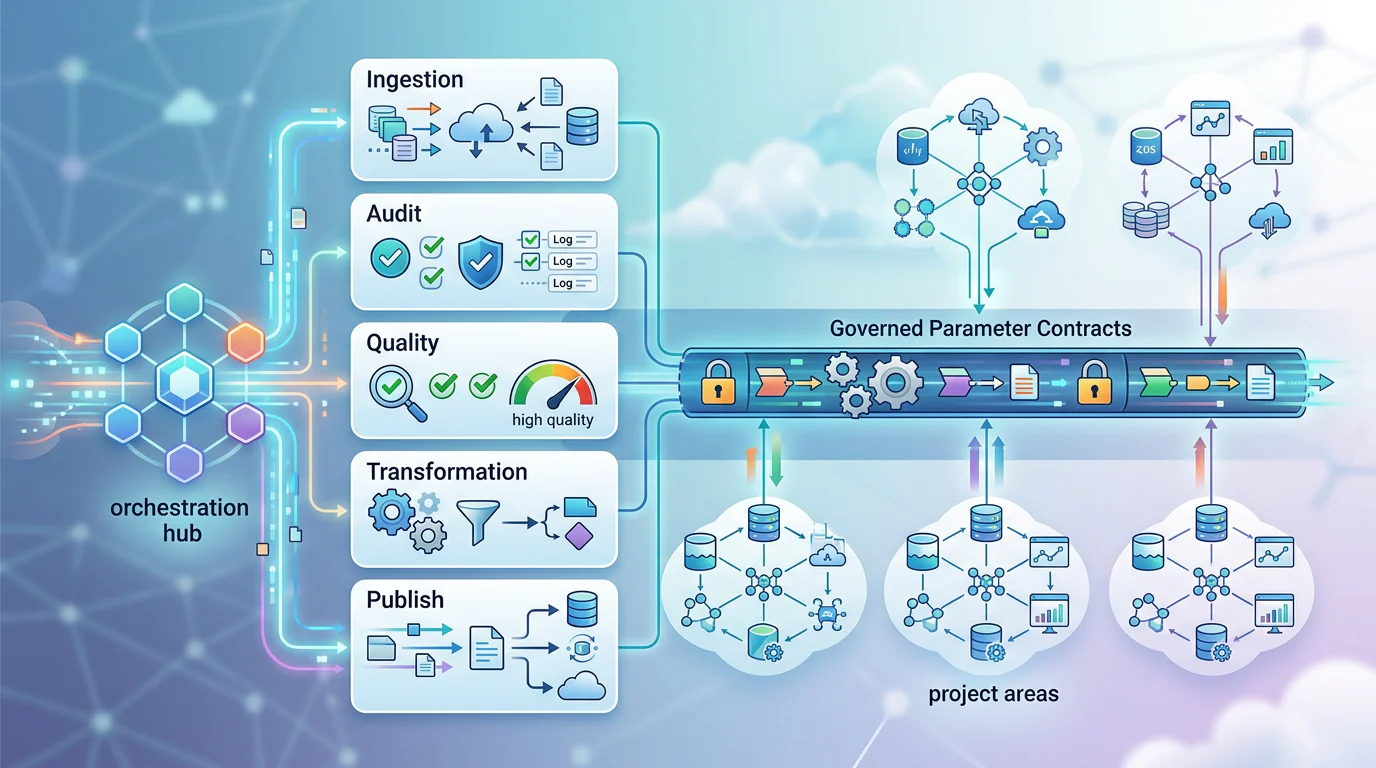
We centralize repeatable behavior into parameterized child pipelines, shared data contracts, environment configuration, and approved transformation components. This gives each team flexibility at the edges while keeping ingestion, audit, error handling, and reconciliation consistent.
Which Components Should Be Reusable?
A master pipeline should call parameterized child pipelines for ingestion, standard audit logging, quality checks, and publishing. The child pipeline receives source, sink, watermark, and environment values, then emits a common run contract. ADF’s Execute Pipeline activity supports invoking a child pipeline with parameter values, which makes this a practical modular design rather than a naming convention.
For visual transformations, mapping-data-flow flowlets can create reusable snippets across multiple mapping data flows. They are currently public preview, so we would use them selectively and maintain an explicit fallback for critical production logic. Microsoft’s flowlet documentation confirms their reuse purpose and preview status.
How Should Teams Govern Shared Logic?
Give every component an owner, version, input and output contract, test fixture, and change history. Global parameters should hold stable factory-level values, while per-run values remain pipeline parameters. Do not bury storage account names, schema names, or connection behavior inside copied pipeline JSON.
A governed lakehouse model gives the reuse pattern a durable destination: one set of controls for data products, rather than a new set of transformations for every project.
How Should Azure ETL Pipelines Use CI/CD?
CI/CD is the control system for a phased migration. It keeps a successful pilot from becoming an unrepeatable production configuration, and it makes each wave inspectable before the next one begins. We use source control for the development factory, versioned deployment artifacts for promotion, environment-specific values outside the code, and a tested rollback path.
Microsoft recommends Git integration for the development factory only, with test and production deployed through CI/CD. Its CI/CD guidance also recommends pre-deployment and post-deployment scripts for safely handling triggers.
| Control | Design Decision | Evidence To Retain |
|---|---|---|
| Source Control | Use Git for development changes and pull requests | Commit, review, and branch history |
| Promotion | Deploy versioned artifacts through Azure DevOps | Release record and artifact version |
| Environment Values | Override parameters per environment | Reviewed parameter file |
| Validation | Test connectivity, deployment, data counts, and hashes | Automated validation report |
| Trigger Safety | Stop and restart changed triggers through scripts | Trigger-state log |
| Rollback | Re-deploy the prior approved artifact | Rollback runbook and release record |
| Secrets | Use managed identity and Key Vault references | No secret findings in repository |
| Monitoring | Route diagnostics to shared observability tooling | Alert and retention configuration |
The migration itself should follow seven controlled steps:
- Assess: Inventory assets, dependencies, risk, ownership, and test data.
- Classify: Approve retain, wrap, convert, or rebuild for every workload.
- Establish: Configure identity, networking, observability, Git, and deployment parameters.
- Pilot: Move representative workloads and measure behavior against the source.
- Reconcile: Compare row counts, hashes, business totals, durations, and alerts.
- Cut Over: Deploy approved artifacts, control triggers, and preserve a rollback window.
- Optimize: Retire wrappers only after stable operations and prioritize the rebuild backlog.
Use our pipeline modernization framework to turn those release gates into a repeatable engineering practice.
Build Azure ETL Migration Judgment with Vision Board
At Vision Board, we help Azure data engineers turn these choices into implementation skill, not slideware. Our learning approach starts with the assets teams actually inherit: SSIS packages, SQL jobs, storage paths, security boundaries, and production release controls. We teach teams to decide what deserves preservation, what needs a wrapper, and what is worth modernizing, then to prove the decision with reconciliation and repeatable deployments. You can use the framework in this article to structure a migration backlog, but durable progress depends on engineers who can operate the platform after project handoff. Our courses focus on Azure data engineering patterns that make decisions easier to explain, test, and govern across teams. Start with our Azure data engineering training, then build practical migration judgment with Vision Board.
FAQs on Azure ETL Migration Path
Which Azure ETL Migration Path Avoids Rewriting Pipelines?
Use Azure-SSIS Integration Runtime for compatible packages when current behavior matters more than redesign. Validate dependencies, package version, execution time, and operating cost before committing.
How Can We Reuse Legacy ETL Logic in Azure?
Start with an inventory recording owners, schedules, sources, sinks, dependencies, credentials, duration, and recovery needs. Then classify every package or job as retain, wrap, convert, or rebuild.
What Tools Bridge On-Premises ETL and Azure?
Use a self-hosted integration runtime for private sources and custom drivers while Azure Data Factory orchestrates workloads. Cluster nodes when availability or throughput justifies operational responsibility.
How Do You Map Legacy Jobs to Azure Pipelines?
Define parameterized child pipelines for repeated ingestion and audit work, use factory-level environment values, and govern transformation components with explicit owners, contracts, tests, and version histories.
How Should Azure ETL Pipelines Use CI/CD?
Use Git in the development factory, promote tested artifacts through Azure DevOps, safely override environment values, validate results, and retain a prior release for controlled rollback.