

TL;DR
We show beginner builders how to turn a prompt form into a safe, repeatable text-to-image app without training a model first. We explain the diffusion workflow, prototype architecture, prompt controls, defect fixes, and practical production safeguards. We also show when to use targeted editing, layout controls, adapters, or a different base model.
How to Build a Text-to-Image App
Building a generator is now more a product and integration problem than a model-training problem, so we focus on the smallest useful path from prompt form to reliable prototype. A 2024 research project annotated more than 37,000 images for human artifacts, showing why a polished interface still needs a repair path.
A text-to-image app turns a user’s prompt into model conditioning, starts from noise or a supplied image, and repeatedly denoises it into an illustration. We recommend beginning with a hosted generation API, recording settings, applying safety checks, and giving users retry and edit controls. Distorted anatomy and inconsistent details are model-generation failures, not merely evidence of bad prompting.
We will cover the generation workflow, the skills a beginner needs, a practical prototype architecture, repeatable prompting, artifact diagnosis, and the controls that make an app safer to run.
How Does a Text-to-Image App Turn Words into Images?
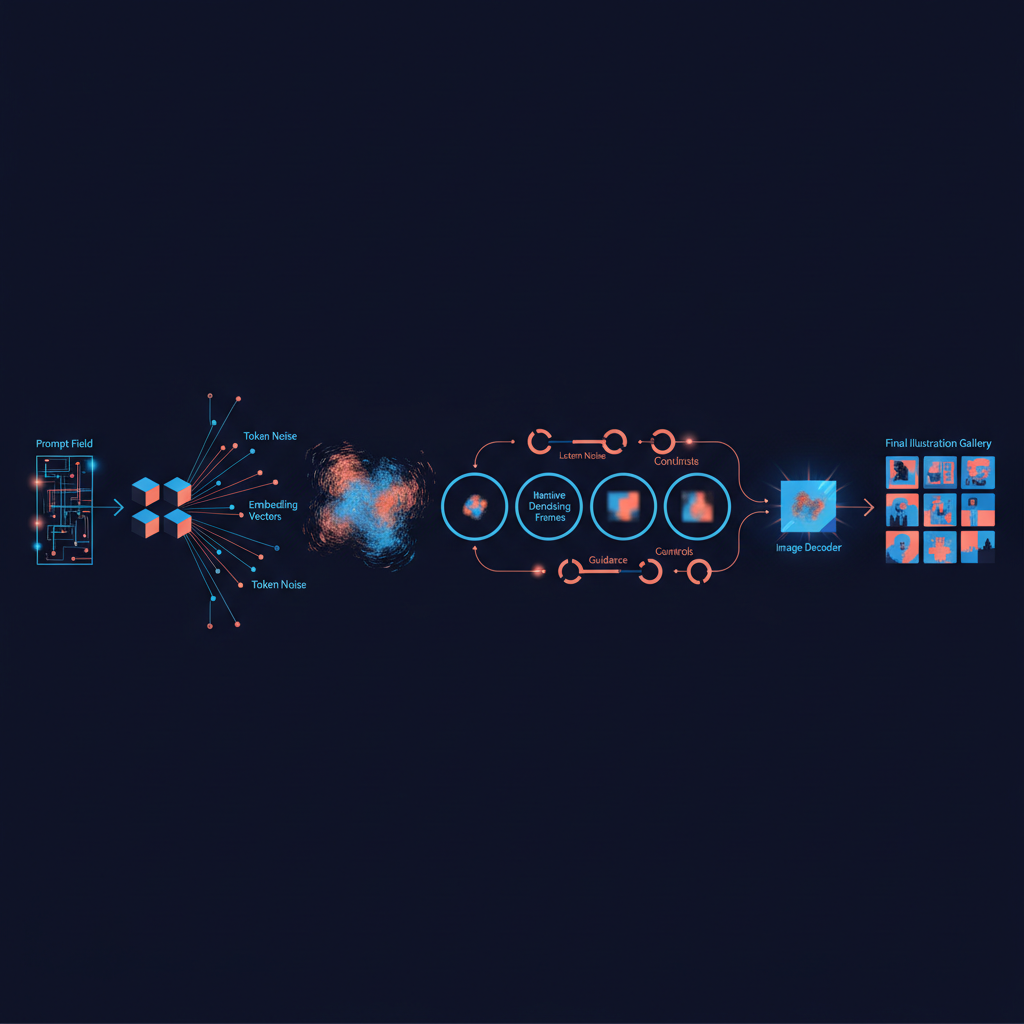
We do not need to train a model to understand the workflow our app is calling. A prompt becomes numerical conditioning, a generative process works from noise or an input image, and a decoder returns visible pixels. The latent diffusion paper explains why this approach uses text conditioning and compressed image representations instead of repeatedly working across every output pixel.
How Do Tokens Become Visual Instructions?
First, the model tokenizer breaks a prompt into units it can process. A text encoder then turns those units into embeddings, which are mathematical representations of meaning. We can think of those embeddings as instructions that keep the image process aimed at the requested subject, setting, composition, and style.
Why Does Generation Start with Noise?
For ordinary text-to-image generation, the system starts with random latent noise. It removes noise step by step while consulting the prompt embeddings. For image-to-image work, it starts with an encoded source image instead, adds controlled noise, and then rebuilds it into a variation.
What Do Schedulers and Guidance Change?
A scheduler chooses the route and timing of the denoising process. Guidance affects how strongly the result follows the prompt, but more guidance is not automatically better. The guidance research describes the quality and diversity trade-off, which is why we should test settings rather than assume a stronger value fixes every weak image.
Where Do Reference Images Fit?
Reference images add visual context that text alone may not convey. A source image can preserve broad composition, a mask can isolate one area for repair, and a pose, edge, or depth input can hold a layout in place. Once this model is clear, our app becomes easier to explain, debug, and improve. For a visual refresher while building, we recommend our short learning playlist.
What Should You Learn Before Building One?
We suggest learning the smallest set of skills that lets us own the whole prototype. That means enough Python to write server logic, enough API knowledge to handle requests and failures, enough image handling to save files correctly, and enough deployment knowledge to protect secrets and publish the app.
| Stage | Learn | Deliverable |
|---|---|---|
| Python Basics | Functions, JSON, environment variables, validation | A script that accepts and checks a prompt |
| API Fundamentals | HTTP requests, authentication, errors, retries | A successful image-generation request |
| Image Handling | Dimensions, formats, bytes, storage | A saved image displayed in a browser |
| Frontend Basics | Forms, loading states, errors, history | A usable prompt-to-image interface |
| Deployment | Hosting, logs, databases, object storage | A shareable prototype |
| Model Controls | Seeds, aspect ratios, edits, evaluation | Repeatable generation presets |
| Safety | Consent, moderation, limits, abuse reporting | A responsible release checklist |
We do not need advanced mathematics before starting, but we do need to understand what our system stores and why. The 2024 NIST profile identifies 13 generative-AI risks and more than 400 actions for managing them, which makes safety and monitoring practical engineering work, not an afterthought.
Build the early version around one narrow illustration use case. A custom avatar helper, lesson visualizer, or social-image assistant is easier to evaluate than a tool promising every style for every audience. When we need a structured place to continue learning, our course catalog can support the next technical step.
How Do We Build a Text-to-Image App Prototype?
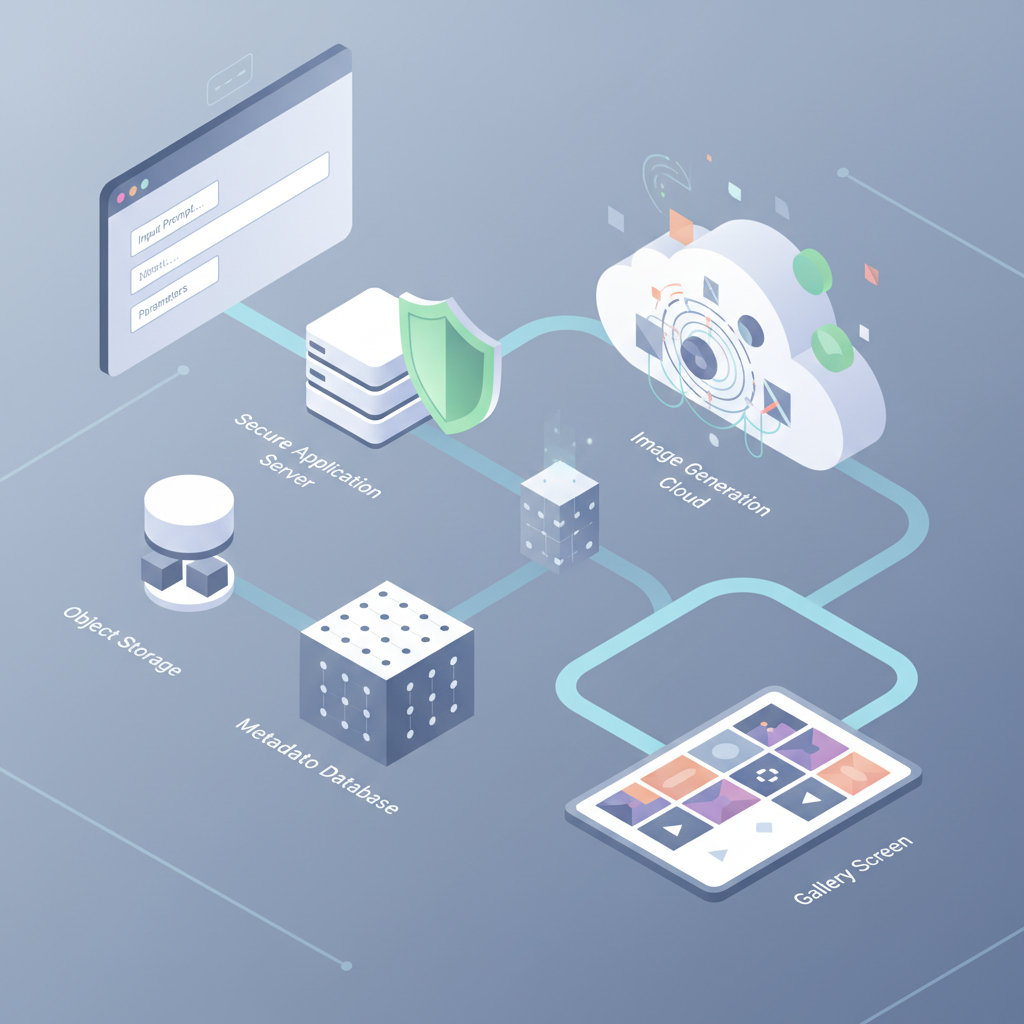
Our first text-to-image app should make one request path reliable before adding advanced controls. The user submits a prompt and aspect ratio, our server validates the request, checks safety rules, calls the model, saves the output and settings, and returns a generation record to the browser.
We should store the prompt, optional negative guidance, dimensions, seed when available, model version, source-image consent status, moderation result, output location, and timestamp. That history turns a lucky image into a repeatable setting, and it gives users a meaningful regenerate button rather than a blank retry.
settings = validate(prompt, aspect_ratio, reference_image)
reject_if_unsafe(settings.prompt)

result = image_api.generate(
    prompt=settings.prompt,
    size=settings.aspect_ratio,
    reference=settings.reference_image
)

reject_if_unsafe(result.image)
save_image_and_metadata(result.image, settings)
return generation_record(result)
A good interface shows progress, handles failed requests, and preserves the last successful result. We also recommend a simple job queue once generation takes long enough that a browser request might time out. Our Telegram community is a useful place to compare implementation decisions with other learners.
For reproducibility, change one variable at a time. Keep the seed and dimensions fixed while testing prompt wording, then keep the prompt fixed while testing aspect ratio or a reference image. This makes each retry a useful experiment instead of another random image.
Why Do AI Images Have Artifacts, and How Do We Fix Them?
Artifacts happen because the generator is estimating visual relationships, not constructing an image with explicit human understanding. It can produce impressive surfaces while still failing at counting, spatial relationships, text, occlusion, and anatomy. The benchmark study found persistent difficulty with counting, spatial relations, and composing multiple objects.
When users need status updates or a new release notice while they test these controls, our WhatsApp channel can help them stay connected.
How Do We Diagnose the Defect?
We begin by asking whether the flaw is local or global. A hand that looks wrong in an otherwise good image is a local repair problem. A scene with the wrong pose, object count, or overall style is a generation-control problem. That distinction prevents us from restarting a successful image unnecessarily.
| Defect | Likely Cause | First Fix | Escalation |
|---|---|---|---|
| Distorted Anatomy Or Faces | Weak structural coherence, occlusion, tiny features | Enlarge the subject and simplify the pose | Use pose control, inpainting, or a different base model |
| Garbled Text | Weak typography representation | Add final copy outside the generated image | Use a workflow designed for text rendering |
| Duplicated Objects | Counting and entity-binding weakness | State the exact count and separate entities | Use layout control or manual composition |
| Wrong Composition | Weak spatial understanding | Put placement first in the prompt | Use a sketch, edge, depth, or pose input |
| Inconsistent Style | Conflicting prompt instructions | Simplify the style recipe | Use a style adapter or different base model |
| One Broken Detail | Local denoising failure | Mask and inpaint the region | Use image-to-image revision or regenerate |
When Should We Inpaint or Use Image-To-Image?
Use inpainting when most of the output works and one region needs replacement. A mask tells the generator where it may alter pixels, while the prompt tells it what to create there. Use image-to-image when the whole result needs a controlled variation but should retain the broad structure of a supplied image.
When Should We Use ControlNet or LoRA?
Use ControlNet when we need spatial control, such as preserving a pose, sketch, depth map, or edge layout. Use LoRA when we need a reusable learned style or subject behavior that works with a compatible base model. The ControlNet paper specifically describes conditioning through inputs such as edges, depth, segmentation, and human pose.
| Need | Best First Choice | Reason |
|---|---|---|
| Repair One Area | Inpainting | Keeps the successful parts intact |
| Create A Broad Variation | Image-to-Image | Starts from an existing image structure |
| Preserve Pose Or Layout | ControlNet | Adds spatial conditions beyond text |
| Apply A Reusable Style | LoRA | Adds a specialized adapter to a base model |
| Improve Overall Capability | Different Base Model | Changes the underlying strengths and limits |
The anatomy assessment groups common human-image errors into proportion, extra, orientation, configuration, and missing errors. We should use that framing to describe the problem precisely, then choose the smallest intervention that can solve it. We share more practical build discussions through our LinkedIn profile.
How Do We Take a Text-to-Image App to Production Safely?
A hosted API is the sensible first stage because it reduces infrastructure work while we test whether users value the feature. Customized pipelines come next when we need repeatable style, controlled composition, or editing. Self-hosting only makes sense when demand, privacy requirements, model control, or measured latency justify operating GPU capacity.
For a concrete infrastructure reference, current managed GPU pricing lists an L4 GPU at $0.0001867 per second, or roughly $0.67 per GPU-hour before CPU, memory, storage, and egress. We should compare that complete operating cost with the provider cost per completed image, not with an isolated GPU figure.
Latency needs the same discipline. A managed GPU service may take about five seconds to start an instance according to its startup documentation, but that is not the same as a user-facing generation-time promise. We should measure warm and cold p50 and p95 times by model, image size, batch size, and enabled controls.
- Safety Filtering: Check prompts, reference images, and outputs. Keep a human review path for uncertain cases.
- Consent And Privacy: Ask for explicit permission before accepting identifiable reference images, minimize retention, and give users a deletion route.
- Rate Limits: Authenticate users, limit requests by account and IP, queue work, and apply bounded retries.
- Abuse Controls: Add reporting, audit records, and a fast way to disable a risky feature or model.
- Copyright Review: Record human edits and creative decisions. The copyright guidance says prompts alone do not establish human authorship.
- Risk Monitoring: Review user reports, rejection rates, failures, and emerging misuse. A 2026 privacy statement reflects concerns from 61 data-protection authorities about identifiable AI-generated imagery.
A production release is not just a faster generate button. It is a system that can explain what happened, preserve a useful retry path, and protect the people whose prompts and images it handles. Our learner stories show why steady, testable progress matters more than copying a complex stack on day one.
Build with Vision Board
At Vision Board, we teach the engineering habits that make this kind of project manageable: make a small version, measure the result, then improve it deliberately. For a text-to-image app, that means learning enough Python to validate requests, enough API design to protect keys and handle errors, enough image handling to store outputs, and enough product thinking to decide what users can edit. We also help learners turn unfamiliar cloud and data concepts into practical building blocks, so a prototype does not become a collection of copied snippets. Start with the workflow in this guide, test it with a narrow illustration use case, and keep a record of the prompts and settings that succeed. When you are ready to build more confidently, use our courses, videos, and community resources to keep the learning path moving. Build your next project with Vision Board
FAQs on Text-to-image App
We answer the questions that matter most when we are moving from a first experiment to a useful image-generation product.
Do I Need to Train a Model?
No. We recommend using a hosted API first, then learning prompt controls, storage, safety checks, and evaluation before considering self-hosted models or custom training work.
What Does a Seed Do?
A seed initializes the random starting point. When model and settings stay fixed, retaining it helps us compare prompt changes and reproduce a result reliably.
When Should I Use ControlNet or LoRA?
Use ControlNet for layout or pose, and LoRA for learned style or subject behavior within a compatible base model after simpler prompt changes prove insufficient.
Can Prompt Edits Fix Every Artifact?
Prompt edits can help, but anatomy, counting, composition, and text remain difficult generation tasks. We diagnose the fault, then choose targeted controls or regeneration carefully.